Token usage
What Studio's usage numbers mean: how full the context window is, what a chat has spent, and how much of your provider plan's limits is left.
Where in StudioComposer → Context usage
Updated View as markdown
On this page
Studio shows three kinds of numbers. The context window is what the agent holds right now. The chat's totals are what the chat has spent over its whole life. Your plan's limits are how much your provider account has left. Agents run on your own provider accounts, so Studio estimates and shows usage but does not bill it.
| What you want to know | Where to look |
|---|---|
| How full the agent's context is | The ring in the composer, which opens Context usage |
| What this chat has cost | Context usage, below the context window |
| What one Orchestra agent used | That agent's record on the agent map |
| How much of your plan's limits is left | Usage in the account menu, and Settings → Agents |
Context usage
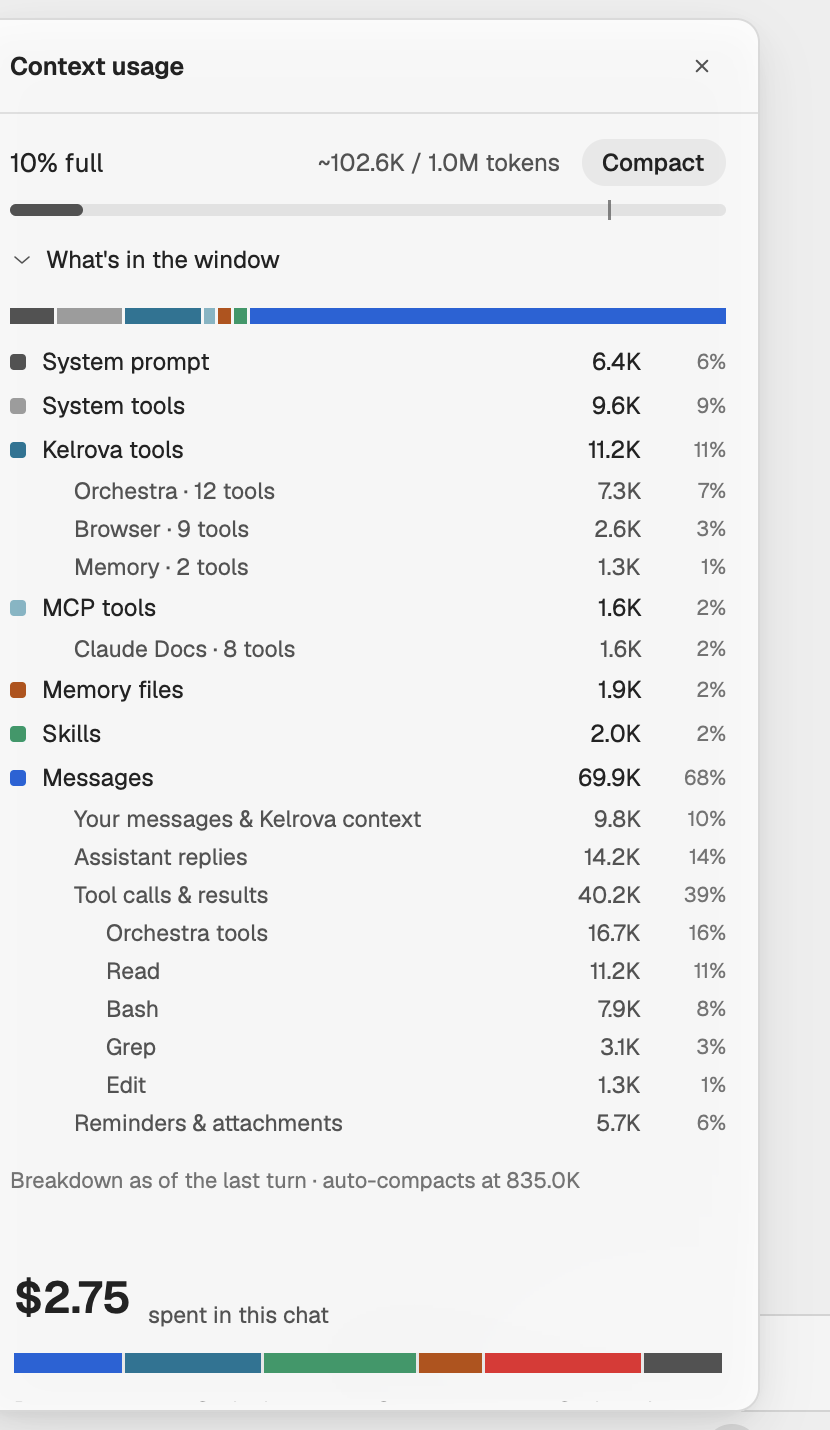
Click the small ring in the composer to open Context usage. Its top half is the agent's context window. Its lower half is the chat's lifetime totals.
The context window
- N% full and ~used / max tokens say how much of the model's context window the last turn filled.
- A tick on the gauge marks where the provider compacts automatically, when it reports that point.
- What's in the window unfolds the breakdown as of the last turn: the system prompt, tools, Kelrova tools (the tools Studio itself attaches, such as Orchestra and the browser), your MCP servers, skills, memory files and Messages. Messages split into your messages and Kelrova context, assistant replies, tool calls and results, and reminders and attachments. For Codex the breakdown is an estimate from the session log, and tool definitions sit in the remainder.
- Compact asks the agent to compact now. It appears when the agent supports it and works only while the agent is idle. After a compaction the panel says Compacted once or Compacted N times.
Compaction shrinks the window, not what was spent: the gauge can drop while the chat's totals keep growing. Automatic compaction for Claude Code and Codex is set in Settings → Agents. See Context and compaction.
What the chat has spent
The lower half leads with an estimate of what the chat has spent, then one bar split by agent and a row per agent: Main agent first, then Subagents in an Orchestra chat. Subagents the model starts on its own are counted in Main agent.
| Figure | Meaning |
|---|---|
| Prompt | Every token sent to the model: new input, plus input read from the cache, plus input written to the cache. |
| Cached | The share of the prompt that was read from the provider's cache. Cache reads cost less than new input, so a higher share is cheaper. |
| Output | Tokens the model wrote, reasoning included. |
| Cache write | Input the provider stored in its cache for later turns. |
The cost is Estimated at published API list prices; subscription plans bill differently. When a model has no list price on record, the panel names it and the cost shown is a floor. For Codex, a call whose prompt is above 272,000 tokens is priced at OpenAI's long-context rate: twice the input and cache price and one and a half times the output price.
These totals are stored outside the model's context, so compaction keeps them. If the panel says This provider has not reported token accounting yet., the agent has not reported any usage for this chat.
One Orchestra agent
Each agent on the agent map has its own Context usage: its latest context window above the cost of all its runs. See The agent map and records and Limits and usage.
Your plan's limits
Providers such as Anthropic and OpenAI limit how much an account may use in a window, for example a session window and a weekly one.
- The account menu. Click your avatar at the bottom of the navigation rail. Usage lists each provider account with a meter per window, the share used and when the window resets. Use the refresh button to read the numbers again. Hovering the avatar shows a one-line summary, such as each provider's highest share.
- Settings → Agents. Each agent's row shows the active account's plan and its fullest window, and each account shows its meters.
A meter turns to the warning color at 80% and to the danger color at 95%. Cursor and Devin keep their logins in their own tools, so they show Connected through the Cursor SDK or Connected through the Devin CLI instead of meters.
When a limit runs out, the turn stops with a row such as Session limit reached. Studio can wait for the reset and retry; see Troubleshooting.
Long pauses in a long chat
Providers cache the start of a conversation for a while. After a long pause, the whole history may be processed again, which adds to usage. So before you send in an idle chat that holds at least 100,000 tokens of context, Studio asks Continue a long chat?: after one hour for Claude Code and after thirty minutes for Codex.
- Continue sends the message in this chat.
- New chat moves your draft, files and voice clips to a new chat in the same project, without the old history. Nothing is sent until you send it.
- Cancel keeps the draft.
The warning is a rule of thumb about the cache, not a price quote.