Report a problem
Send a support ticket from Studio, with diagnostics from this device you can read line by line or leave out. Nothing leaves the device before you send.
Where in StudioStudio → Settings → Report a problem
Updated View as markdown
On this page
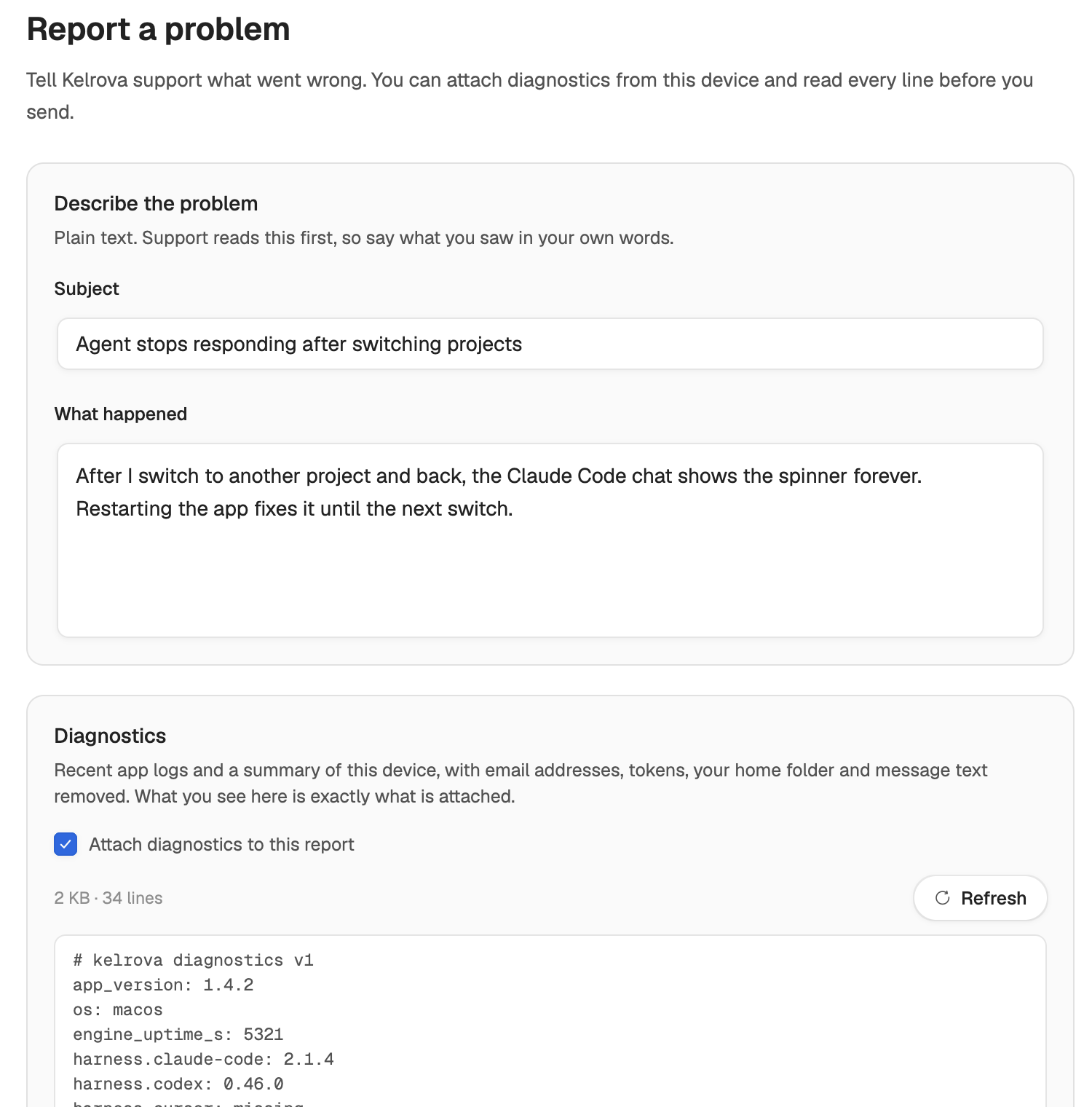
Open Settings → Report a problem, describe what went wrong and choose Send report. The report reaches Kelrova support as a ticket on your account. You can attach diagnostics from this device, and you read every line of them before you send. Nothing leaves the device before Send report.
Before you start
You need to be signed in to your Kelrova account, and support tickets belong to an organization. When either is missing, the pane says so instead of showing the form:
- Sign in to report a problem: sign in from the account menu, then come back.
- Join an organization to report a problem: create or join one from the account menu, then come back.
- Support isn't available for your organization: support requests are turned off for your organization, so reports cannot be sent from this device.
Send a report
Describe the problem
Under Describe the problem, fill in Subject (up to 150 characters) and What happened (up to 10,000 characters). Write plain text in your own words: what you were doing, what you expected, and what happened instead. Support reads this first.
Read the diagnostics
Attach diagnostics to this report is on. Below it, Studio prepares the text and shows it in full. Scroll through it; what you see is exactly what is attached. Choose Refresh to build it again with the latest logs, or turn the switch off to send only the subject and description.
Send
Choose Send report. The line above the button says what goes: your subject, description and the diagnostics, or only the subject and description.
When the report is sent, the pane shows Report sent, whether diagnostics were attached and a reference such as SUP-7K4M5N6P. Quote it if you contact Kelrova about the report. Send another report starts a new one.
What the diagnostics hold
Diagnostics are recent app logs and a summary of this device, with email addresses, tokens, your home folder and message text removed. The summary has lines such as:
- the app version, the operating system and how long the engine has been running;
- the version of each agent's command-line tool, or that it is missing;
- the number of files and bytes in each of Studio's data folders, such as logs, chat journals, uploads and worktrees;
- whether the current and previous log files exist.
Studio keeps the attachment under 2 MB. When the logs are longer, the preview says Oldest lines left out to stay under 2 MB. With no log file yet, it says only the device summary is included.
Note: Your description is not redacted
The removal applies to the diagnostics. The subject and description are sent as you type them, so do not paste passwords, tokens or other secrets into them.
When sending does not work
| Message | What to do |
|---|---|
| The diagnostics changed after you reviewed them. | Read the refreshed text, then send again. |
| The diagnostics were prepared a while ago | They were rebuilt with the latest logs. Read them, then send again. |
| Too many reports were sent from your account just now. | Try again in a few minutes. |
| You have too many open support requests. | Wait for a reply on one of them first. |
| Diagnostics can't be attached right now. | Send again to file the report without them. |
| Diagnostics are turned off | Kelrova is not accepting diagnostics right now. The report is sent without them. |
| Diagnostics couldn't be prepared on this device. | Choose Try again, or send the report without them. |
| Couldn't send your report. | Check your connection and try again. |
If your account changed while a report was sending, the pane warns that it may not have reached support. Check your support requests before you send it again.
Other ways to reach us
Support for your organization's Kelrova account is also on the web; see Getting help. Before you sign up, use the contact page.