The plan card
The orchestrator's plan shows in the Plan card beside the chat and in the composer's plan panel: each step, its status, its agents and its clock.
Where in StudioComposer → Plan
Updated View as markdown
On this page
At the start of a run the orchestrator declares a plan: the steps it will deliver, in order. You do not write the plan; you read it. It shows in two places: the Plan card under the Agents card beside the chat, and the plan panel above the composer.
Step statuses
| Status | Meaning |
|---|---|
| Pending | Not started. Shown with a hollow ring. |
| In progress | Agents are working on it. Shown with a moving dot. |
| Done | Finished. Shown with a filled check. |
| Skipped | The orchestrator decided the step is not needed. |
| Failed | The step could not be delivered. |
| Unresolved | The run ended while the step was still open. |
The orchestrator moves steps along as agents report, can add steps as the work grows and records a short note when it closes one.
The Plan card
The card sits under the Agents card in the agent map. Its header shows Plan, the steps done out of the total, such as "2/4", and the run's clock. Click the header to fold the card to that one line.
Each step is one line: its status mark, its title and, once it started, its clock. A step that several agents work on at once shows how many. After about ten steps the list scrolls.
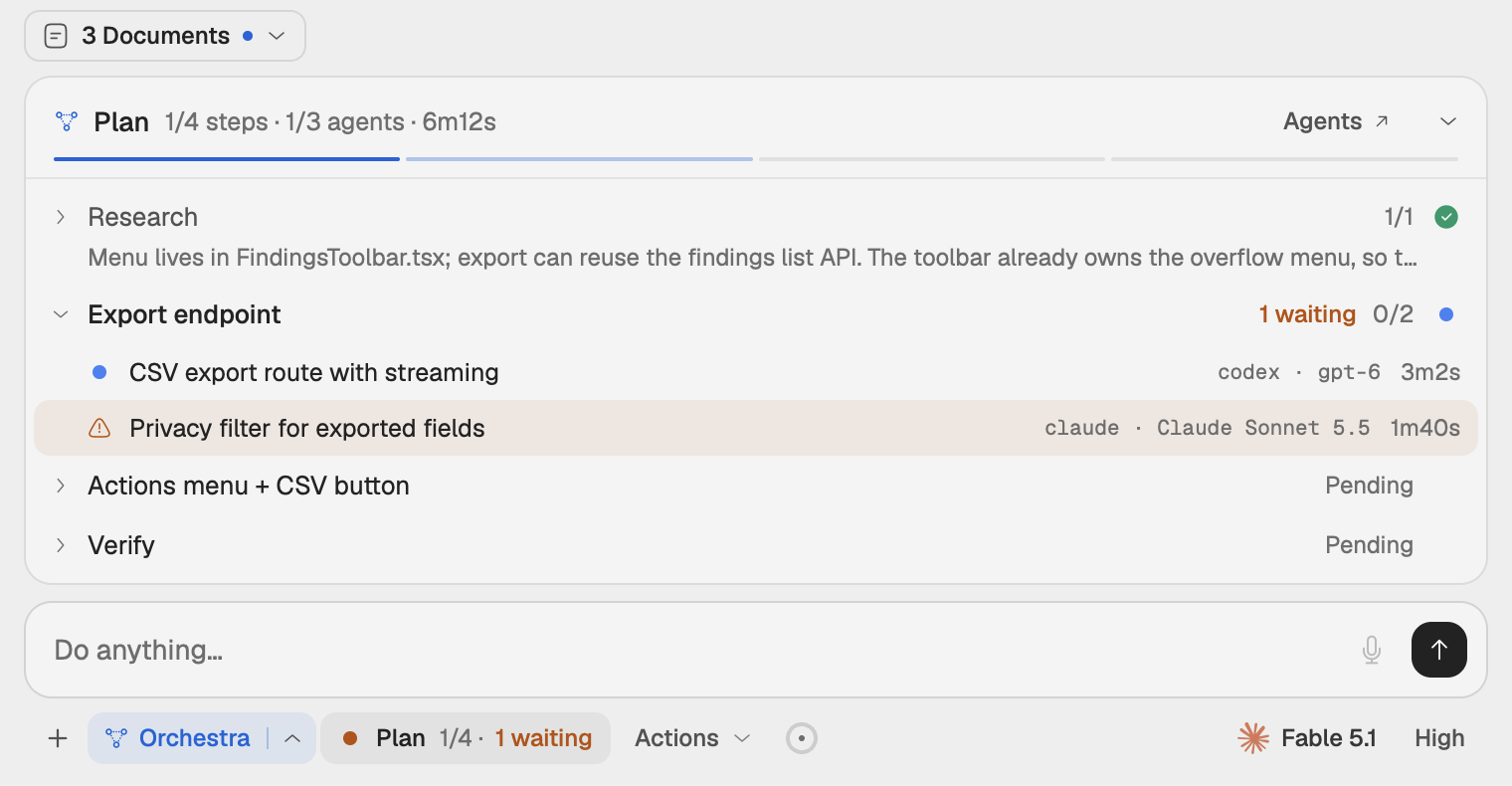
The plan panel in the composer
While Orchestra is on and the run has an agent or a step, a Plan control appears beside Orchestra under the message box. It sums up the run while the panel is closed:
- an amber "N waiting" when agents wait for an answer to a question,
- a red "N failed" when steps or agents failed,
- otherwise the steps closed so far and the run's clock.
A thin bar on the composer's top edge shows one segment per step in its status color. Click the Plan control (Show plan) to open the panel above the composer. Its header repeats the figures, for example "2/4 steps · 3/5 agents", and the clock. Click the header, or Hide plan, to close it.
The panel lists one group per step, in plan order, with its count of finished agents or its status. The step in progress is open; click any other to open it. Each agent line shows its task, its provider, model and reasoning, the attempt when it was retried, and its clock. A step's closing note shows under its title. Agents that no step claimed are under Unassigned. Before the orchestrator declares a plan, the panel lists all agents under Agents.
When the agent map is not beside the chat, Agents in the panel's header opens it as a drawer.
The run's clock
The clock starts when the first agent starts. It keeps running while any agent works and stops when the last one finishes, so it measures the work, not the idle time after it.
Note: Not the same as Plan mode
With Plan turned on in the composer, an agent writes a plan for you to read and apply with Apply plan. That is a separate feature. The Orchestra plan is the orchestrator's own, and it updates as the run goes.