Mix providers and accounts
Give each role its own model and up to two fallbacks from any provider, override them for one chat, and choose which account the chat runs on.
Where in StudioStudio → Settings → Subagents
Updated View as markdown
On this page
Every role names its own model, so one Orchestra run can plan with Fable 5.1 in Claude Code, research with Grok 4.7, build with SWE-2 in Devin and test with GPT-5.6 in Codex. You set the models in three places, from the widest to the narrowest:
| Where | Applies to |
|---|---|
| Settings → Subagents | Every project. |
| A project's Subagent Profiles | That project, over the global setting. |
| Session models in the composer | This chat only. |
The orchestrator never sees which provider or model an agent runs on. It picks agents by role.
Set a role's models
Open the role
In Settings → Subagents, choose Edit on a built-in role. For a built-in role only the execution models can be changed: provider, model, reasoning and model parameters.
Pick the chain
Under Execution models, set the Primary model, then the 2nd model (fallback) and 3rd model (fallback) if you want them. Fallbacks are tried in order when a provider cannot answer.
Save
Choose Save changes.
If all the models in a chain are from one provider, the editor warns that they may share quota or session limits. A fallback on another provider keeps the role working when one provider hits its limit.
Change models for one chat
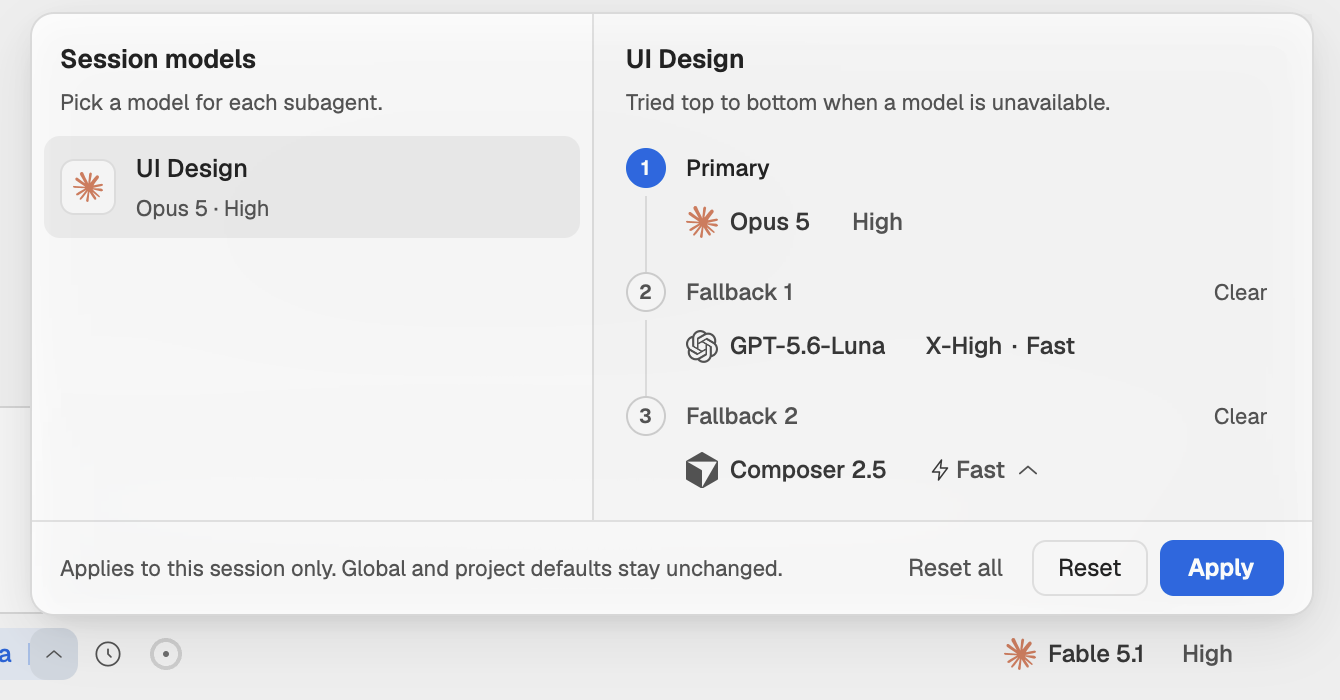
The arrow next to Orchestra in the composer opens Session models: the roles on the left, the chosen role's chain on the right, Primary, Fallback 1 and Fallback 2, tried top to bottom when a model is unavailable.
Open Session models
Click the arrow beside Orchestra.
Pick a role and its models
Choose a role, then a model in each slot. Clear empties a fallback, Reset returns the role to its profile's models and Reset all does that for every role.
Apply
Choose Apply. A dot on the arrow shows that this chat has its own models.
This changes only this chat. Global and project defaults stay as they are.
What an agent shows when it falls back
In the lanes view, an agent's card says when it moved to another model, for example "Sonnet rate limited · fell back". When an agent is waiting for its provider instead, its card shows the reason and when it resumes, for example "Session limit · resumes in 42m". The agent's record lists every model it ran on under Targets.
Accounts
Agents run on your own provider accounts, the ones you sign in to in Settings → Agents.
- When a provider has two or more saved accounts, the composer shows a settings button right of the effort control. Pick the account the chat runs on there, or Device default for the one selected in Settings → Agents.
- Agents on the same provider as the chat use the chat's account. Agents on another provider use the account selected for that provider in Settings → Agents.
- Each provider counts its own usage, so agents on different providers draw on separate quotas.
See Models, reasoning and accounts for the account menu.