Limits and usage
Up to 30 agents run at once and each task gets at most two hours. See what an Orchestra run used per agent in Context usage and in each record.
Where in StudioComposer → Context usage
Updated View as markdown
On this page
Orchestra runs agents in parallel up to a fixed limit and gives each task a fixed time budget. Every agent runs on your own provider account, so its tokens count against that provider's quota.
Limits
| Limit | Value | What happens at the limit |
|---|---|---|
| Agents running at once | 30 per run, and 30 per computer across all runs | More agents wait in the queue; their cards say "Waits for a free slot". |
| Time per task | 2 hours | The agent is told to wrap up before the time runs out. If it does not finish, its status is Timed out. |
| Agents per role in one turn | The role's Maximum tasks per parent run | The orchestrator cannot start more agents of that role in the turn. |
| Questions per agent | 6 to the orchestrator | Further questions are answered at once: the agent decides itself, notes its assumption and goes on. |
| Updates per agent | 6 from the orchestrator | The orchestrator cannot send that agent more. |
| Plan steps | 12 open at a time | Finished steps stay in the plan and do not count. |
| Levels | 1 | Agents cannot start agents. |
A role can have a shorter time limit than two hours: set Maximum timeout (seconds) on a custom profile. It cannot go above two hours. The built-in roles allow 40 tasks per turn, except Code Implementation and Code Review, which allow 200.
When an agent asks the orchestrator a question, the agent waits up to five minutes for the answer. If the orchestrator takes the question to you, it holds the agent for up to 30 minutes from when the question was asked; the agent's row shows how much of that time is left.
Agents run on the computer that hosts the chat. A chat on a remote device runs its agents on that device.
See what a run used
Open Context usage from the context gauge in the composer. For an Orchestra chat it shows the whole chat:
- the estimated total cost, with one bar split by agent: Main agent (the orchestrator) and each subagent, with its cost and share;
- under Subagents, the number of agents and what each used;
- tokens as Prompt (with how much was Cached) and Output.
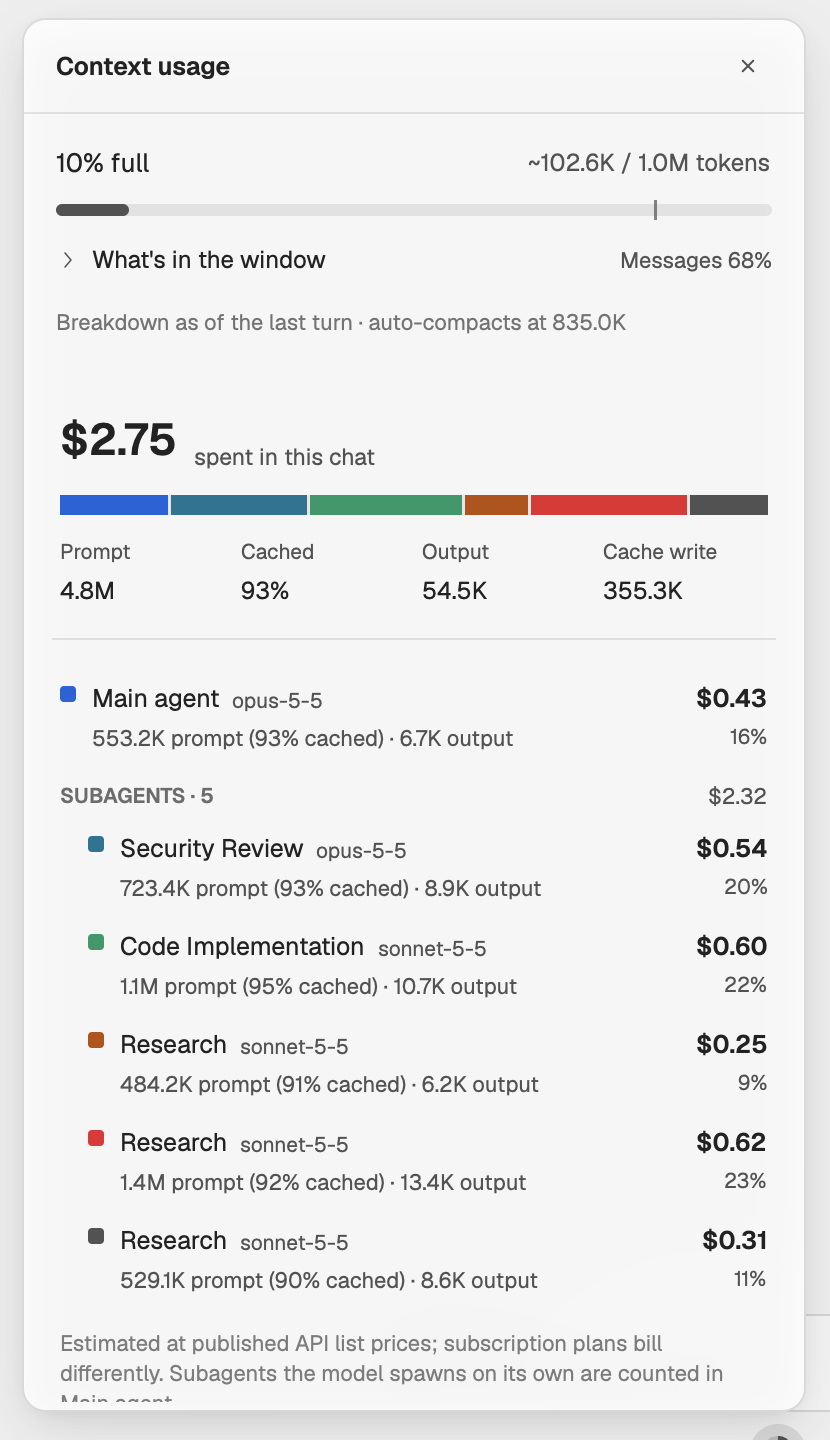
For one agent, open its record. Tokens and Cost cover all its runs, and its Context gauge opens the agent's own Context usage: its latest context window above the cost of each run.
Note: Costs are estimates
Costs are estimated at the providers' published API list prices; subscription plans bill differently. When a model has no list price on record, the cost shown is a floor, marked with a +.
Keep the orchestrator's context in check
A long run fills the orchestrator's context. In Settings → Agents, on the Claude Code and Codex panes, the Auto compact card has an Orchestrator auto compact row: compact Orchestra chats at their own token limit. When it is off, they use the limit above it, or Kelrova's default. See Context and compaction.