Re-verify earlier findings
Check the open findings your filters match against the code again, without searching for new ones: the dialog, the estimate, the tier and the run it starts.
Where in the portalSecurity → Findings → Re-verify all findings
Updated View as markdown
On this page
Re-verify checks the open findings your filters match against the code again. It does not search for anything new, so it is the quick way to learn which old findings still hold.
Where in the portalSecurity → Findings → Re-verify all findings…
Start a re-verify run
Filter the findings list
Re-verify takes the open findings that match the filters currently set on the Findings page. Narrow the list first if you only want some of them, such as one severity.
Open the dialog
Choose Re-verify all findings…. The dialog asks "Re-verify all findings?" and says how many open findings match the current filters. It also says that no new findings are searched for.
Read the figures
The dialog lists "Matching open findings" and "Estimated time", for example "About 12 minutes". The estimate is an approximation, not a promise that the run will finish by then.
Pick a tier and start
Choose a model tier. It starts on your organization's default. The dialog warns "Increases token and time cost." Then choose Re-verify N findings.
You need permission to run scans and permission to view findings. If either is missing, the action is off and the dialog says why. If the estimate fails to load, the dialog shows Try again. If the run cannot start, a message says "Could not verify findings. Try again."
Limits
A run takes up to 500 of the matching findings. The estimate counts every match, including those beyond the 500.
A dependency advisory whose reachability is unknown is skipped and stays open. The next normal scan settles it. See Dependency advisories.
Re-verify always checks fresh, even if the code has not changed.
The run page
The scans list marks the run "Verification" instead of a level.
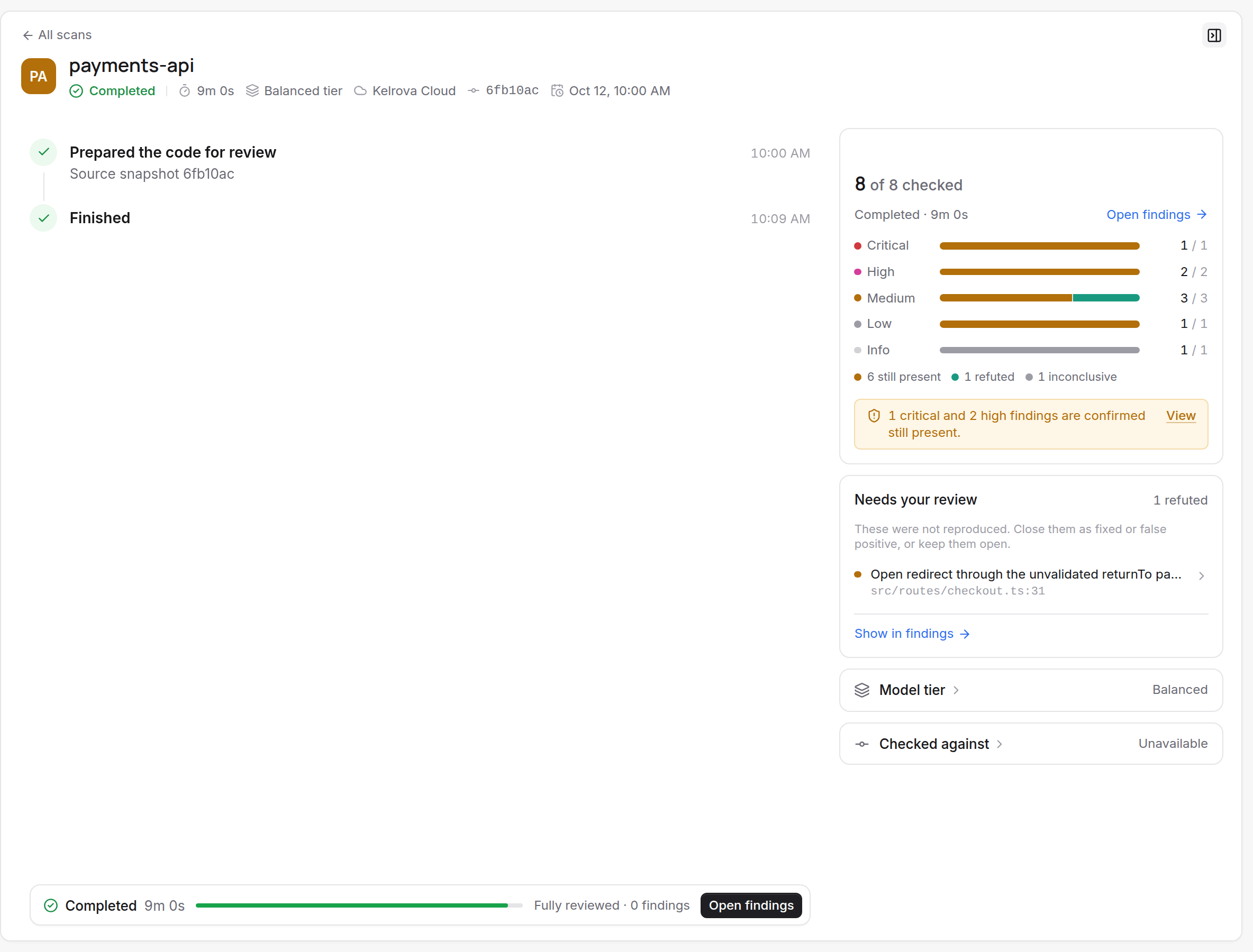
Its pane shows, for each severity, how many selected findings are:
- Still present. The problem is still in the code.
- Refuted. The check showed the finding does not hold.
- Inconclusive. The check could not decide.
A "Needs your review" list and the headline update while the run goes. The stop strip counts "N findings not verified yet". On the scans list, the row shows checked out of total, still present, refuted, inconclusive and not checked.
When the run ends, the confirmed and refuted counts link to the findings list filtered to that run.
Re-verify or re-check
Re-verify works on many findings at once. To check a single finding after its fix is merged, use Re-check this finding in Go Fix. See Go Fix: fix, re-check, ask.
A re-verify run uses plan usage like any scan. See What a scan uses.