Duplicates and possible duplicates
How Kelrova flags a finding that may repeat an earlier one, how to merge or keep them separate, review a batch, filter by duplicates and undo a merge.
Where in the portalSecurity → Findings → Actions → Review possible duplicates
Updated View as markdown
On this page
When a scan reports something that looks like a finding you already have, it labels the new one Possible duplicate and links it to the one it may repeat. A member merges the two or keeps them separate, so the list stays short.
Resolve one finding
Open a finding marked Possible duplicate. A card reads May be the same as and names the other finding; its title is a link.
- Merge hides this finding from the default list and keeps the other one. Its history stays.
- Keep separate records that they are two problems.
A merged finding is marked Merged. On its page, Undo merge shows it separately again. The finding it was merged into lists its merged findings under Merged into this finding, each with an Undo button. If a card reads Possible duplicates of this finding, merging hides the other finding and keeps this one.
You need to be able to manage findings to merge or keep separate; others see the cards without the buttons.
Review a batch
Open the review
In the Findings list choose Actions, then Review possible duplicates…. With the Duplicates filter on Possible, the Review and merge… button opens the same dialog.
Choose what to merge
Findings are grouped under the one that is kept, labelled Keeps. Tick the findings to act on. A warning appears when a finding is more severe than the one it would merge into.
Merge or keep separate
Choose Merge with a count, or Keep separate. When it finishes, Undo merges reverses what you merged.
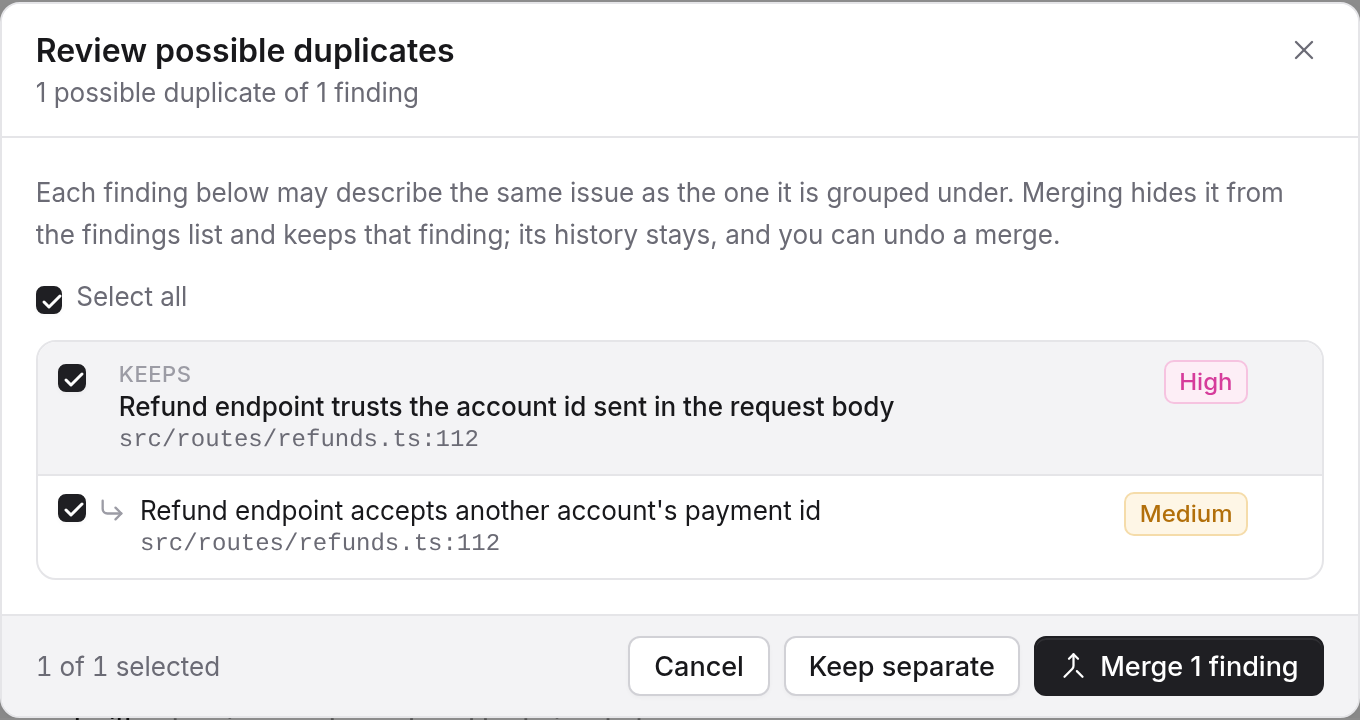
One review reads up to 500 possible duplicates. Open it again after a batch for the rest. When nothing is waiting, the dialog says Nothing to review.
Filter by duplicates
The Duplicates control in the Filter panel has three choices: Not merged, which is the default, Possible and Merged. A run page can link to the possible duplicates of that scan. In the dependency view the control reads Not merged, Possible duplicates and Merged findings.
See Triage a findings list for where this step fits, and Statuses and what changes them for the other review.