Machine clients for CI
Give a CI job or other unattended system its own credential, limited to the access and projects an administrator sets, and request a token from it.
Where in the portalOrganization → MCP server → Machine clients
Updated View as markdown
On this page
A job with no browser cannot use the consent screen. It uses a machine client instead, created by an owner or administrator. None of the interactive clients on Connect a client support this flow: use the official MCP client SDK, or fetch the token yourself and pass it as a bearer token.
For a walkthrough, see Check findings from CI with a machine client.
Create a machine client
Owners and administrators open Organization → MCP server → Machine clients and choose New machine client.
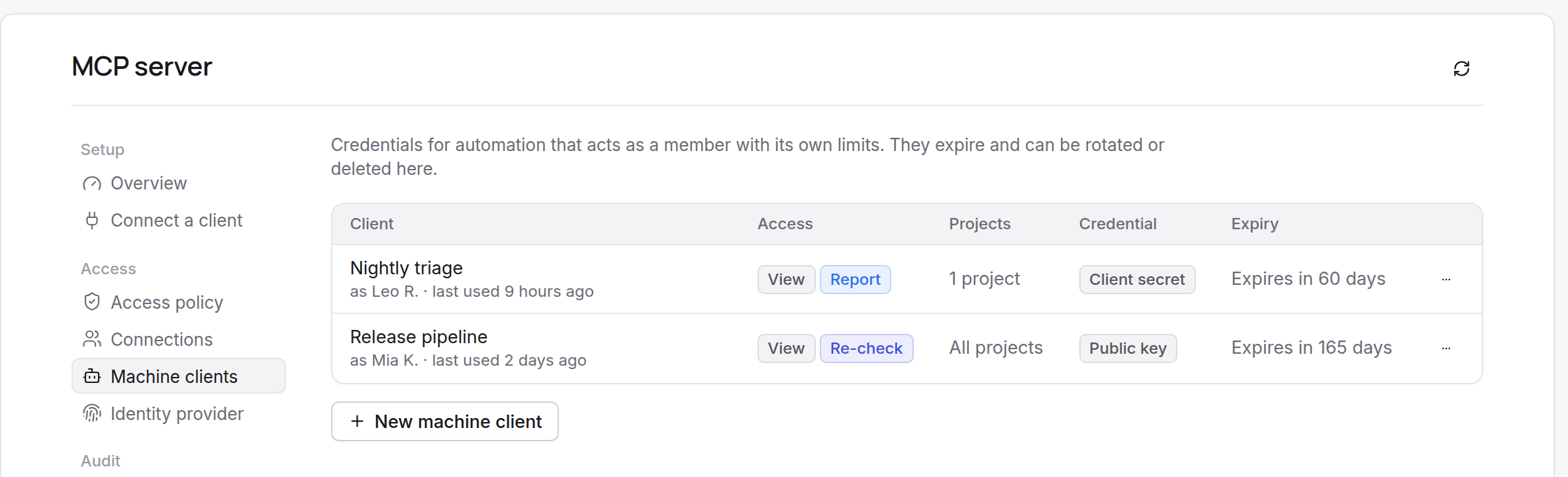
| Field | Meaning |
|---|---|
| Name | Up to 100 characters. It is shown wherever the client acts, as "name (as member)". |
| Runs as | The member the client acts for (default: you). It sees and changes only what that member can, and stops working if the member leaves the organization. Choose a member who can do everything the client is allowed to do in at least one selected project. |
| Access | Viewing findings is always included. Tick Report progress and Request re-checks as needed. |
| Projects | All projects or Selected projects (up to 200). |
| Expires in | 30, 90 (the default) or 180 days, or 1 year. Expired clients stop working; create a new one, because expiry cannot be extended. |
| Credential | Public key (recommended): a pasted JSON Web Key the job signs assertions with. JWKS URL: an HTTPS address Kelrova reads the keys from. Client secret: shown once in Copy the client secret when the client is created or rotated. Kelrova stores only its digest and cannot show it again. |
The row menu has Rotate secret (only for a client with a secret; it shows the new value once) and Delete client, which revokes the client's connection and rejects the next call. An organization can have 50 machine clients.
Request a token
The job receives a short-lived access token from the token endpoint, using the OAuth client credentials extension. It is limited to the access and projects its administrator configured. The resource parameter is required and must be exactly https://mcp.kelrova.com/mcp.
With a client secret:
curl -sS https://mcp.kelrova.com/oauth/token \
  -u "$KELROVA_MCP_CLIENT_ID:$KELROVA_MCP_CLIENT_SECRET" \
  -d grant_type=client_credentials \
  -d resource=https://mcp.kelrova.com/mcp \
  -d scope="findings:read findings:write"
With a key pair (recommended), send a signed client assertion instead of the secret: client_assertion_type=urn:ietf:params:oauth:client-assertion-type:jwt-bearer and client_assertion set to the signed JWT. In the JWT:
issandsubare the client ID.audishttps://mcp.kelrova.com/oauth/token.expis at most five minutes ahead.jtiis unique per assertion.- It is signed with ES256, RS256 or EdDSA.
Use the token
The reply carries access_token, expires_in (15 minutes) and scope. There is no refresh token: request a new token when it expires. Send it on every POST /mcp:
Authorization: Bearer <access_token>
Codex reads a token from an environment variable named by bearer_token_env_var; Claude Code can send a fixed header.
Token request errors
These apply to machine clients and to custom clients that request a token yourself.
| Error | Cause | What to do |
|---|---|---|
invalid_target | resource is missing or is not exactly https://mcp.kelrova.com/mcp. | Enter the URL exactly; send it on every request. |
invalid_scope | An access name is not one of findings:read, findings:write, findings:recheck, offline_access. | Fix the scope string. |
invalid_grant | The authorization code is wrong, expired or used before, or the refresh token is unknown. A second redemption of a code also revokes the connection it created. | Start the sign-in again. |
invalid_client | Client authentication failed, the client is disabled, or its identity document could not be fetched. | Check the credential; for a machine client check its expiry. |
unauthorized_client or unsupported_grant_type | The client may not use that grant, for example client credentials with an interactive client. | Use the right grant for the client kind. |
Warning: Keep credentials out of the repository
A client secret is shown once and cannot be shown again. Store it in your CI system's secret store, and rotate it from the row menu if it leaks.
Machine client changes are listed under Activity; token errors are explained under Token request errors above and in Troubleshooting.