Go Fix: fix, re-check, ask
What Go Fix does on a finding: Fix it now opens a draft pull request, Re-check verifies it again, Ask answers questions. Plus permissions and progress.
Where in the portalSecurity → Findings → a finding → Go Fix
Updated View as markdown
On this page
Go Fix is the button on every finding. It offers three things, and two more that hand the finding to your own tools.
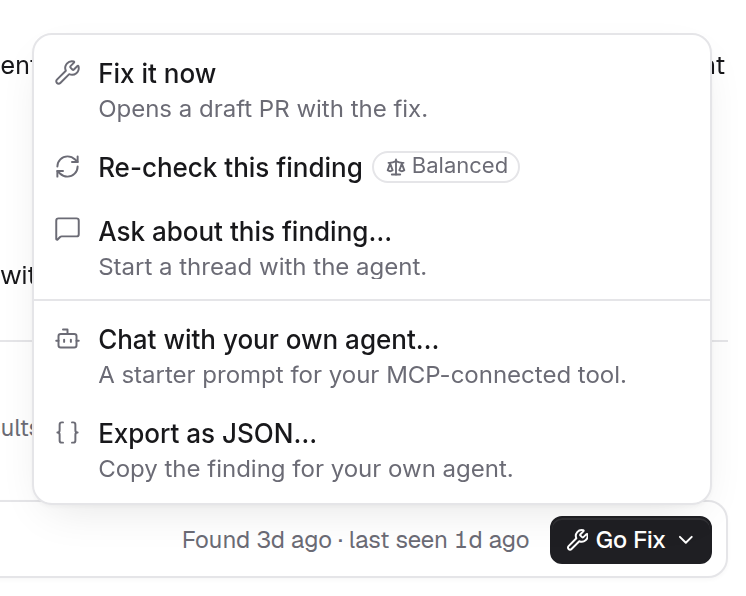
The three actions
| Action | What happens |
|---|---|
| Fix it now | Opens a draft pull request with the fix, on GitHub, GitLab or Bitbucket. The pull request links back to the finding. The merge gates you have turned on for security fixes check it. |
| Re-check this finding | Verifies the finding against the code again. No pull request. On an Adversary finding it verifies the attack path. |
| Ask about this finding… | Starts a thread about the finding, with no code changes. |
Fix it now opens a sheet first. Add Instructions (optional) if you like, and read the Required merge gates list, which can say that no merge gates are required for this fix. A member with the Override merge gates permission can skip a gate that allows it; skipped gates are recorded on the fix and shown on its pull request. An organization can make a gate unskippable.
Fixes, re-checks and questions are charged to the organization balance.
Permissions
Each action follows a permission, and a row you lack is greyed with the reason under it:
- Fix it now needs Fix security findings.
- Re-check this finding and Ask about this finding… need Investigate security findings.
While a run is active on a finding, the button reads Working…, the menu is off and the tooltip says A run is already active for this finding.
Follow a fix
The Remediation section of the side panel shows four steps: Patch, PR, Gates and Merged. Activity shows each run, labelled Fix, Re-check or Ask, with its outcome, for example Fix · draft PR #12 · Succeeded. A re-check that finds the problem gone turns the finding Fixed; a scan that finds it again reopens it. See Statuses and what changes them.
Your own tools
Two more rows sit under a separator:
- Chat with your own agent… gives a starter prompt for your MCP-connected tool. See The MCP server.
- Export as JSON… copies the finding for your own agent. See Export findings.
Fix it by hand
Every finding says how to fix it and how to test the fix, so you can make the change yourself. See Reading evidence. Once a fix is merged, a re-check looks at that one finding without waiting for the next scan.